- My Role
- Product owner & tester — requirements, testing, iteration decisions
- Built with
- Claude (AI-assisted coding). I directed the build and tested every version; Claude wrote the code.
- Timeline & Status
- About one week. Used in a live draft on August 31, 2026.
Overview
My fantasy football league switched to a dynasty format, where you keep your players from season to season. I built a live draft board for our first-ever startup draft: one screen that recommends the best pick for my roster, on a 60-second clock.
Over about a week I ran 20+ mock drafts and rebuilt the tool about 19 times based on what broke, then used it to draft my real team.
02 Highlights
One screen, every decision.
The draft-night version pulls player values from an open market dataset, tags players with injury and role news, tracks my roster's age by position, and syncs picks live from the league's draft room.
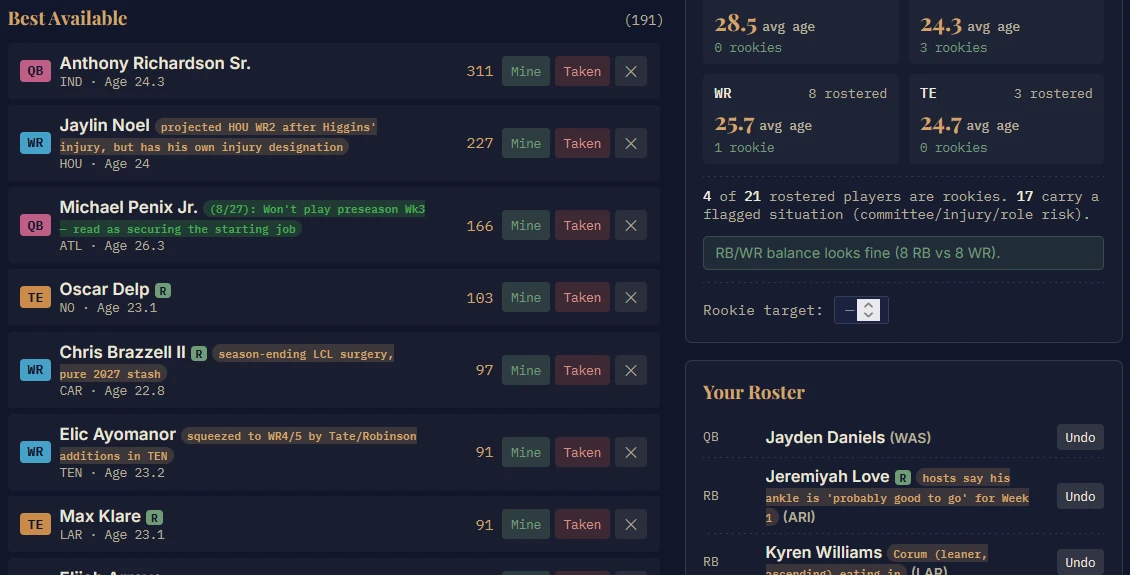
- 1Team AnalyticsAverage age and rookie count by position
- 2Market valuesReal dynasty values, not estimates
- 3News tagsTan = research notes · Green = dated podcast notes
- 4Your RosterEvery pick I made, with undo
03 The Problem
21 rounds. 60 seconds a pick.
In dynasty, a player's age matters as much as this season's points: a 29-year-old star might win you this year and be worth little in three. Our startup draft ran 21 rounds with 60 seconds per pick, and most dynasty values are built for leagues that start two quarterbacks, which overvalues quarterbacks in a single-quarterback league like ours.
I wanted one screen that would tell me the best available player for my roster, and keep me honest about how young or old my team was getting.
04 First Version
A list is too slow when the clock is running.
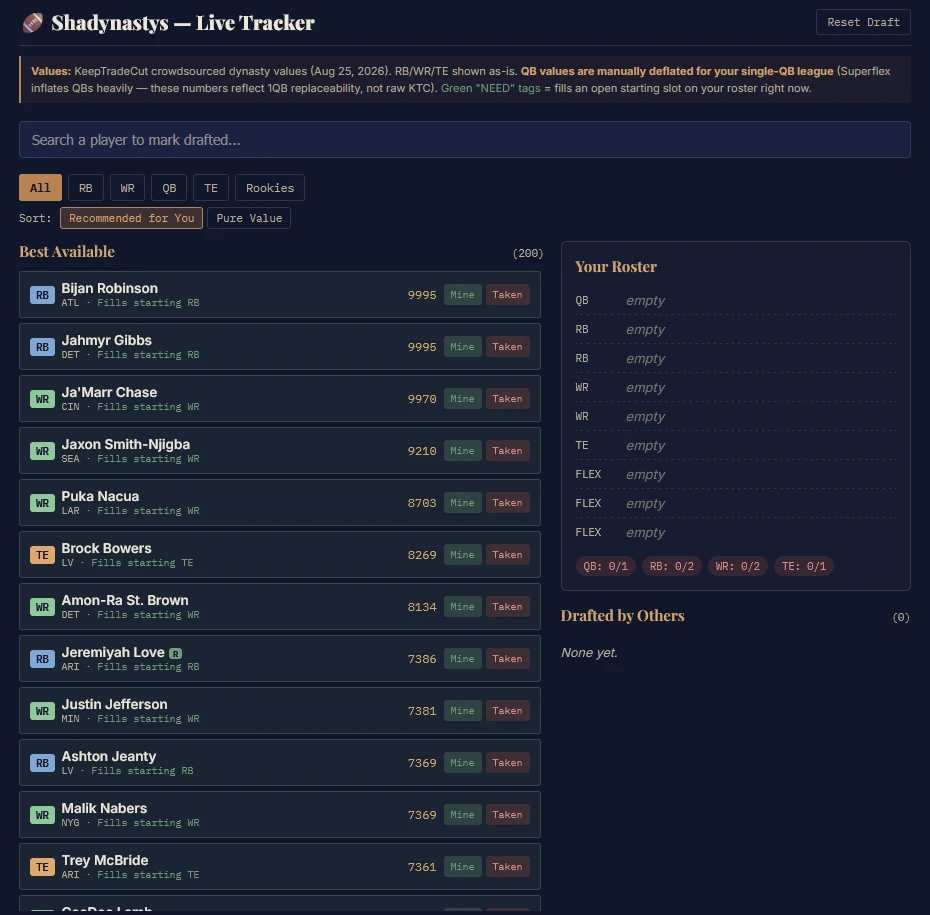
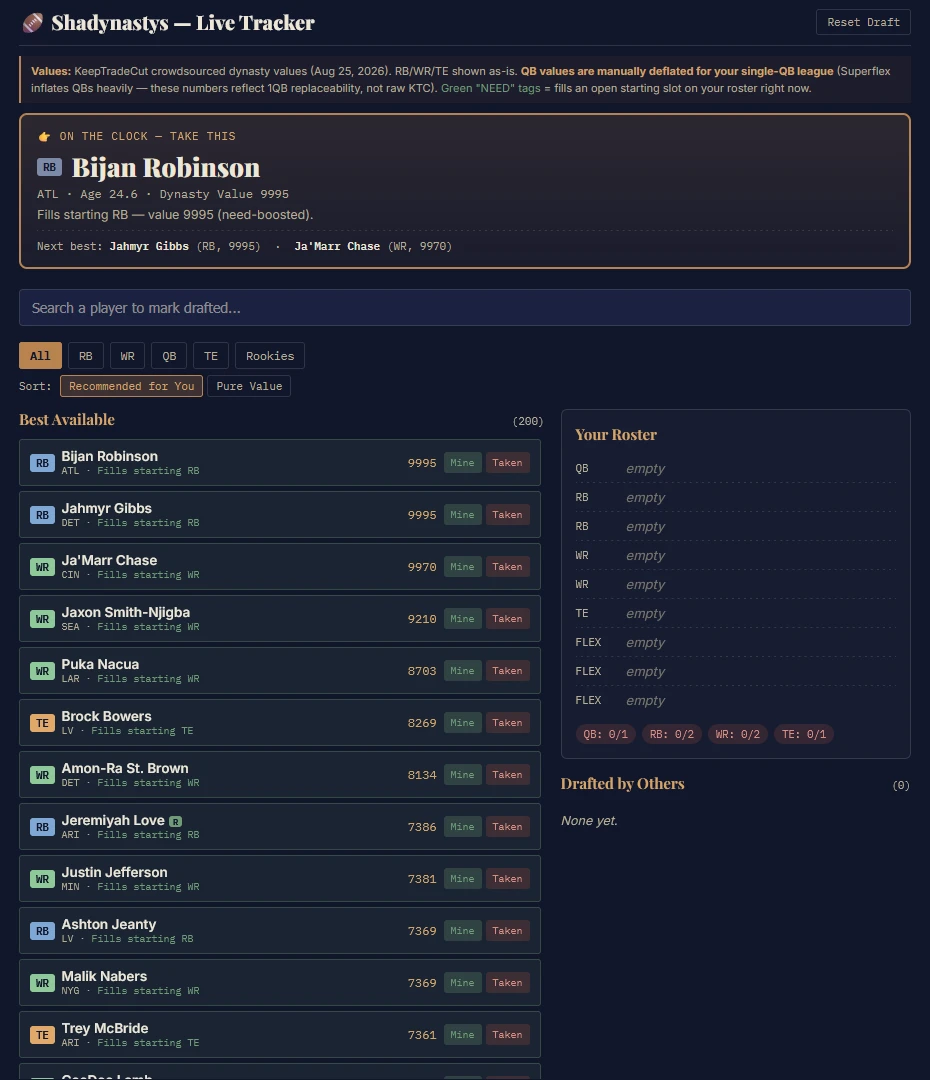
The first version was a sortable list of 200 players with values and an empty roster. Under a 60-second clock, scanning a list took too long, so the next version added an "On the Clock" card that names one player to take, with two backups.
05 Testing
Every mock draft exposed something new. These are the problems that changed the tool most.
5A“Is my team too young, or too old?”
After the first mock, I couldn't tell how my roster was aging. That became a Team Analytics panel: average age and rookie count at each position, plus a warning when running backs and receivers got out of balance.
5BMy rosters kept coming out lopsided.
Three mocks in a row, I was four rounds in with only one running back. Another mock swung the other way and left me with almost no rookies. That led to a bigger phase banner showing my plan for each stage of the draft, and a rookie target.
5CUpdating the pick number by hand was easy to forget.
The tool needed the current pick number typed in by hand. In one mock I forgot until pick 82, after a run on quarterbacks I never saw coming. Pick tracking became automatic, and then live-synced from the league's draft room.
5DIt kept recommending players I'd already passed on.
The tool kept recommending a player I'd already decided against, for about four rounds. I added an Ignore button, plus "Done drafting" buttons to mute a position once it was full.
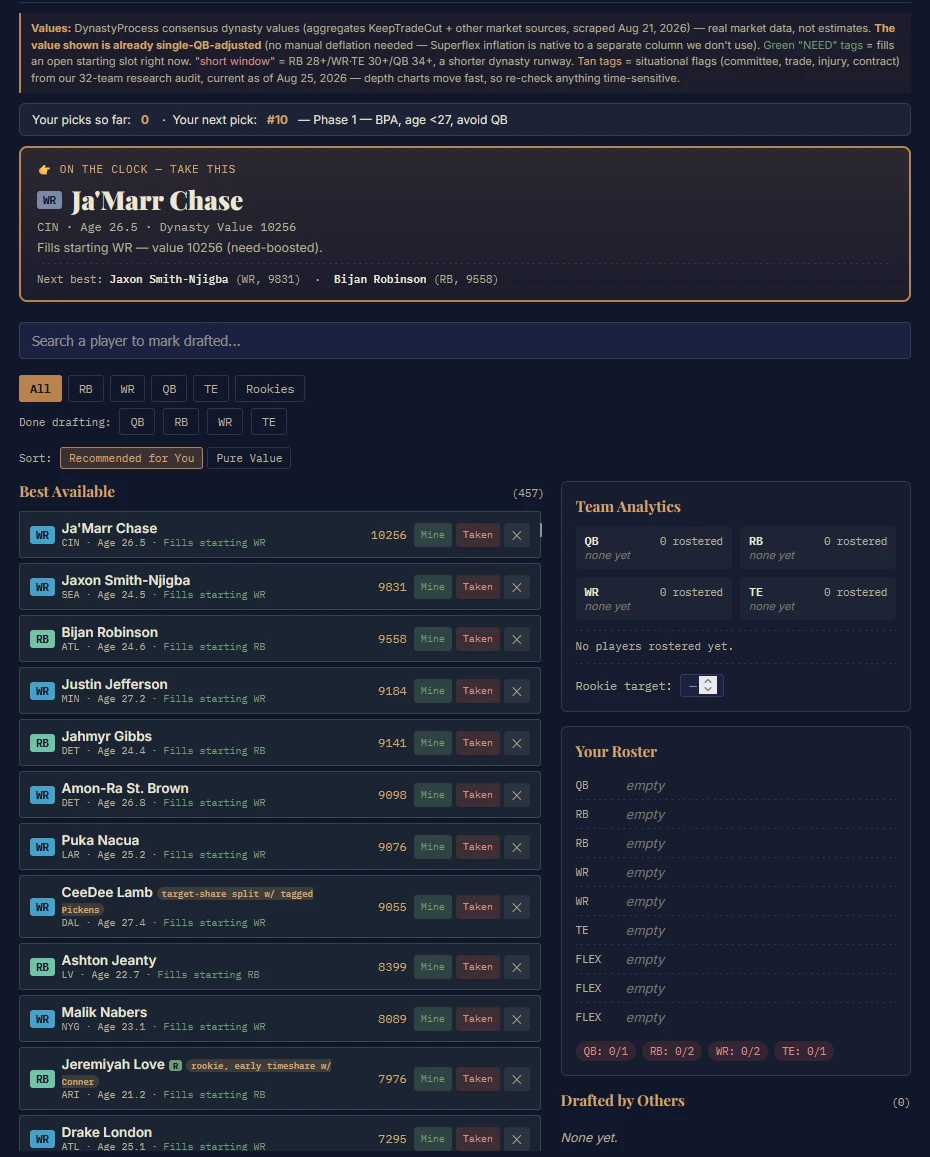
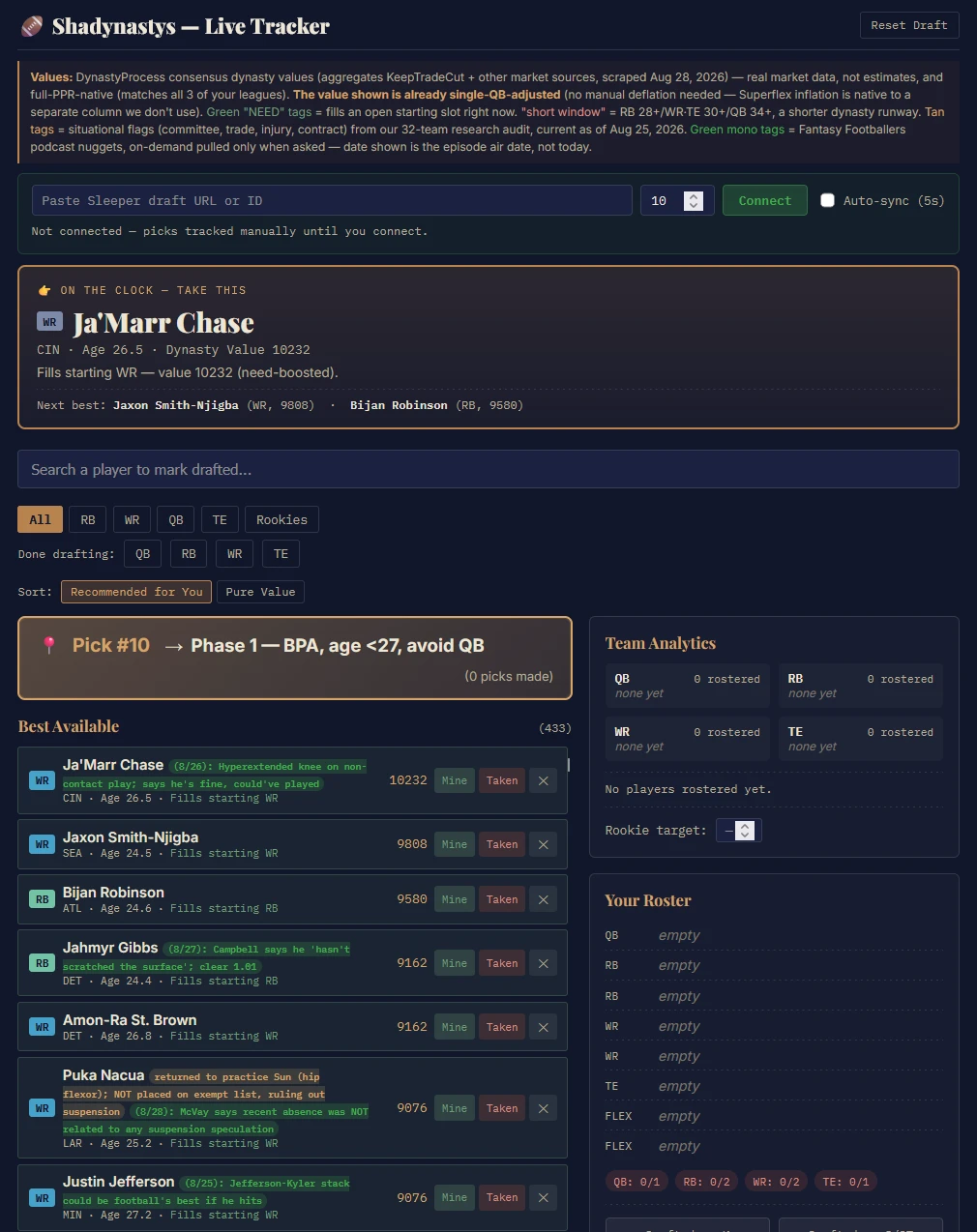
- 1Live draft syncConnects to the league's draft room
- 2On the ClockOne pick to make, two backups
- 3Phase bannerMy plan for this stage of the draft
- 4Podcast tagsDated notes from a fantasy podcast
06 Key Decisions
6AReal data over estimates.
Some players were missing from the original data, so the AI had filled the gaps with its own estimated values, and some were far off: one receiver valued far above where the market ranked him. I didn't want guesses driving recommendations, so we replaced the whole player pool with an open dataset that blends several market sources and is already adjusted for single-quarterback leagues.
6BShould age be part of the math?
Mid-testing, my gut said the tool was favoring young players too much. It turned out the recommendations didn't use age at all; the market values already price age in. Age stayed on screen as context, not as a formula.
6CI decide when a position is full, not the tool.
Once I had enough players at a position, the tool kept recommending more. One fix was an automatic limit: stop suggesting a position once it hits a set number. I chose simple manual buttons instead, the "Done drafting" buttons from testing (5D), because roster needs shift as a draft unfolds and I wanted to make that call myself.
6DOne podcast for the news, instead of 32 teams' worth.
Injury and role news changes a pick, but I didn't want to wade through news for all 32 teams. A fantasy football podcast already covers every team in one place, and I trust the hosts' opinions, so late in the build I added podcast tags: short notes pulled from episode transcripts and shown next to the player they're about (the green tags in Figure 3.2). Each note shows the episode's date, so I could tell at a glance how fresh it was.
6EMaking sure the notes named the right player.
In an early test, two players' names got mixed up when notes were matched from the transcripts, so I set a name-matching process: check every name against the full player pool, and flag anything unclear instead of guessing.
07 Draft Night
Building for year two, not just year one.
I drafted with the tool on August 31. I came away with four rookies, three of them running backs, and around rounds 8 and 9 I shifted toward the future rather than this season.
Right after the draft, KeepTradeCut's league rankings put my roster 6th of 12 overall, with the 3rd-best running back group and the 4th-best tight end group.
- 4
- Rookies drafted, 3 of them running backs
- 6th of 12
- Overall roster
- 3rd
- Running back group
- 4th
- Tight end group
Rankings: KeepTradeCut league rankings, right after the draft.
Age by position was the plan, not an accident.
Age by position mattered to me through every version of the tool: a 30-year-old running back and a 30-year-old quarterback aren't the same bet. Running backs lose value fastest, so I kept that room the youngest, and took slightly older quarterbacks and receivers, positions that hold their value longer.
Eight weeks later.
As of Week 8, KeepTradeCut has my roster 7th of 12, one spot lower than on draft night, after injuries to a few of my players, including my top rookie running back. The age plan is still visible in the numbers below.
| Group | Average age | League rank |
|---|---|---|
| Whole roster | 26.5 | 7th of 12 |
| Running backs | 24.5 youngest group | 4th |
| Tight ends | 26.1 | 6th |
| Wide receivers | 26.5 | 9th |
| Quarterbacks | 30.6* | 4th |
*Includes a veteran backup quarterback I added during the season.
08 Retrospective
What 19 versions didn't catch.
After draft night I found a flaw I'd missed in every version: tags showed where a note came from, but not whether it was good or bad news. A risk and an opportunity looked the same at a glance. Positive and negative tags are first on the list.
Test under real conditions. Mock drafts on a real clock exposed problems that planning never would have.
Don't build on numbers you can't explain. Replacing estimates with market data made every recommendation trustworthy.
Use what you build. The biggest flaw only showed up when the tool was used for real.
Next: positive/negative tags, saving progress across a page reload, and a separate version for season-long leagues, where this year's points matter more than age.
Try the draft-night version.
Click through the exact tool I drafted with, or run it live on your own Sleeper mock draft: start a mock, paste the draft link into the tool, and picks sync in automatically.